ContactsForGood(CFG) Developer Guide
Acknowledgements
Setting up, getting started
Refer to the guide Setting up and getting started.
Design
Architecture
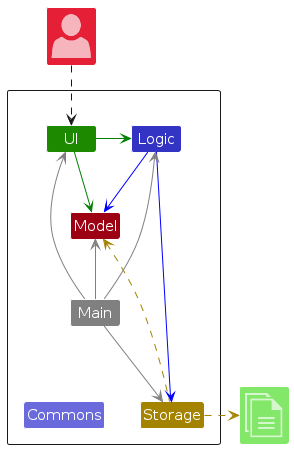
The Architecture Diagram given above explains the high-level design of the App.
Given below is a quick overview of main components and how they interact with each other.
Main components of the architecture
Main (consisting of classes Main and MainApp) is in charge of the app launch and shut down.
- At app launch, it initializes the other components in the correct sequence, and connects them up with each other.
- At shut down, it shuts down the other components and invokes cleanup methods where necessary.
The bulk of the app's work is done by the following four components:
UI: The UI of the App.Logic: The command executor.Model: Holds the data of the App in memory.Storage: Reads data from, and writes data to, the hard disk.
Commons represents a collection of classes used by multiple other components.
How the architecture components interact with each other
The Sequence Diagram below shows how the components interact with each other for the scenario where the user issues the command delete 1.
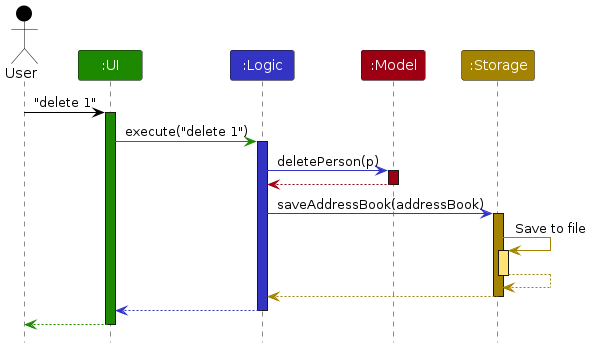
Each of the four main components (also shown in the diagram above),
- defines its API in an
interfacewith the same name as the Component. - implements its functionality using a concrete
{Component Name}Managerclass (which follows the corresponding APIinterfacementioned in the previous point.
For example, the Logic component defines its API in the Logic.java interface and implements its functionality using the LogicManager.java class which follows the Logic interface. Other components interact with a given component through its interface rather than the concrete class (reason: to prevent outside component's being coupled to the implementation of a component), as illustrated in the (partial) class diagram below.
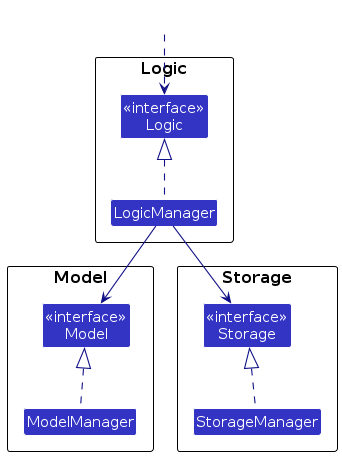
The sections below give more details of each component.
UI component
The API of this component is specified in Ui.java
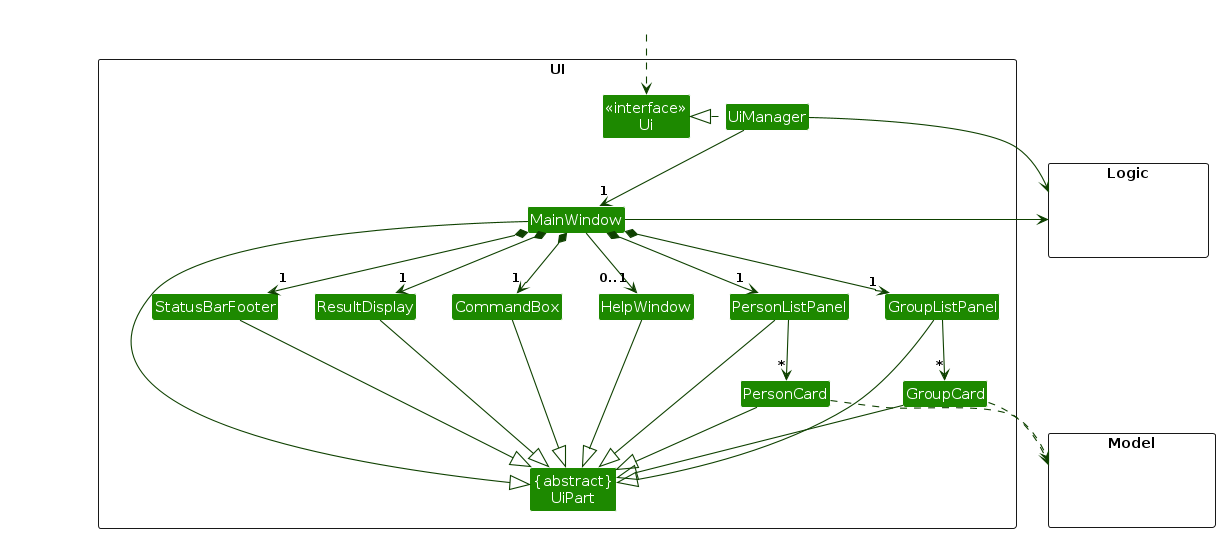
The UI consists of a MainWindow that is made up of parts e.g.CommandBox, ResultDisplay, PersonListPanel, StatusBarFooter etc. All these, including the MainWindow, inherit from the abstract UiPart class which captures the commonalities between classes that represent parts of the visible GUI.
The UI component uses the JavaFx UI framework. The layout of these UI parts are defined in matching .fxml files that are in the src/main/resources/view folder. For example, the layout of the MainWindow is specified in MainWindow.fxml
The UI component,
- executes user commands using the
Logiccomponent. - listens for changes to
Modeldata so that the UI can be updated with the modified data. - keeps a reference to the
Logiccomponent, because theUIrelies on theLogicto execute commands. - depends on some classes in the
Modelcomponent, as it displaysPersonobject residing in theModel.
Logic component
API : Logic.java
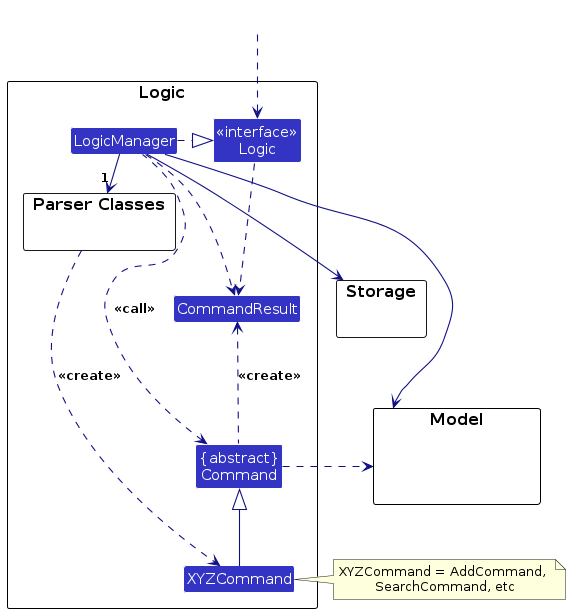
Here's a (partial) class diagram of the Logic component:
The sequence diagram below illustrates the interactions within the Logic component, taking execute("delete 1") API call as an example.
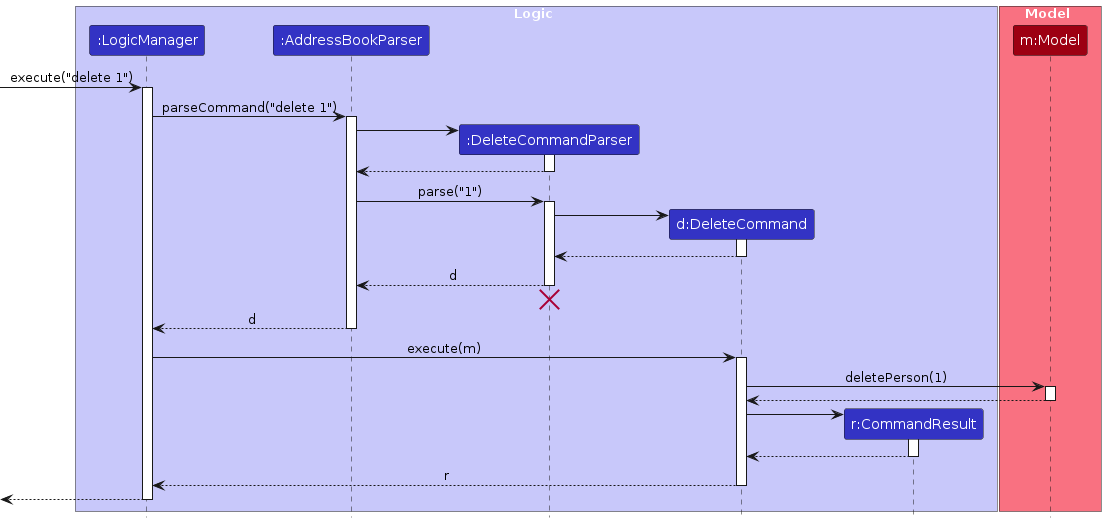
Note: The lifeline for DeleteCommandParser should end at the destroy marker (X) but due to a limitation of PlantUML, the lifeline continues till the end of diagram.
How the Logic component works:
- When
Logicis called upon to execute a command, it is passed to anAddressBookParserobject which in turn creates a parser that matches the command (e.g.,DeleteCommandParser) and uses it to parse the command. - This results in a
Commandobject (more precisely, an object of one of its subclasses e.g.,DeleteCommand) which is executed by theLogicManager. - The command can communicate with the
Modelwhen it is executed (e.g. to delete a person).
Note that although this is shown as a single step in the diagram above (for simplicity), in the code it can take several interactions (between the command object and theModel) to achieve. - The result of the command execution is encapsulated as a
CommandResultobject which is returned back fromLogic.
Here are the other classes in Logic (omitted from the class diagram above) that are used for parsing a user command:
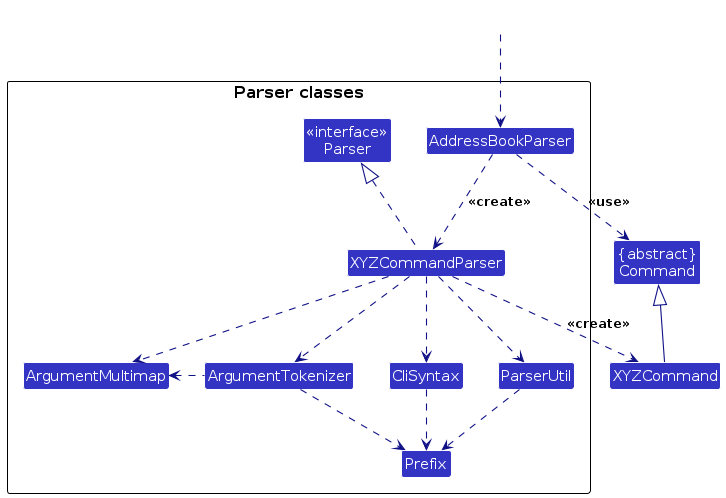
How the parsing works:
- When called upon to parse a user command, the
AddressBookParserclass creates anXYZCommandParser(XYZis a placeholder for the specific command name e.g.,AddCommandParser) which uses the other classes shown above to parse the user command and create aXYZCommandobject (e.g.,AddCommand) which theAddressBookParserreturns back as aCommandobject. - All
XYZCommandParserclasses (e.g.,AddCommandParser,DeleteCommandParser, ...) inherit from theParserinterface so that they can be treated similarly where possible e.g, during testing.
Model component
API : Model.java
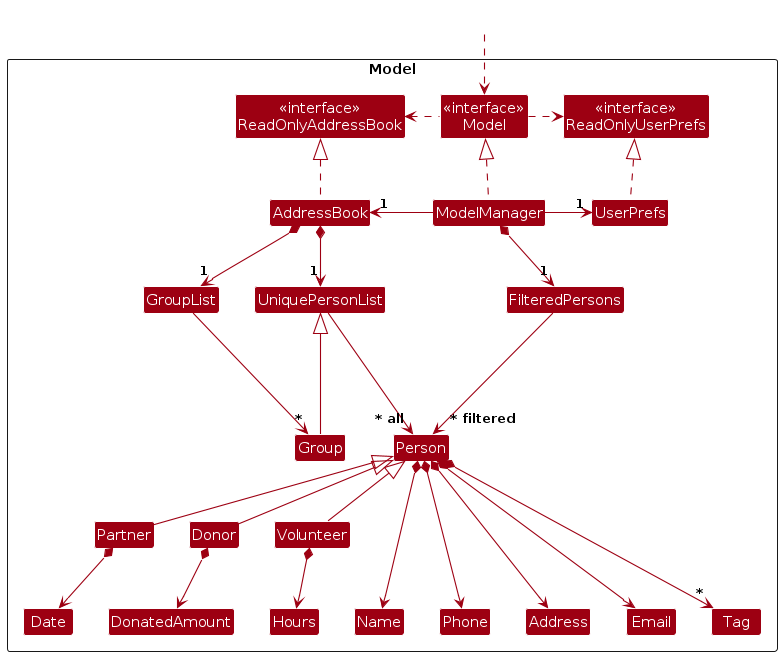
The Model component,
- stores the address book data i.e., all
Personobjects (which are contained in aUniquePersonListobject). - stores the currently 'selected'
Personobjects (e.g., results of a search query) as a separate filtered list which is exposed to outsiders as an unmodifiableObservableList<Person>that can be 'observed' e.g. the UI can be bound to this list so that the UI automatically updates when the data in the list change. - stores a
UserPrefobject that represents the user’s preferences. This is exposed to the outside as aReadOnlyUserPrefobjects. - does not depend on any of the other three components (as the
Modelrepresents data entities of the domain, they should make sense on their own without depending on other components)
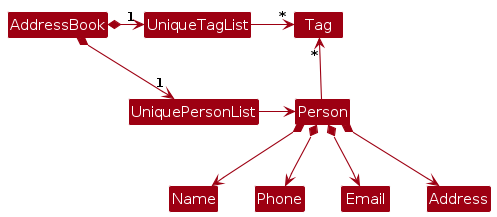
Note: An alternative (arguably, a more OOP) model is given below. It has a Tag list in the AddressBook, which Person references. This allows AddressBook to only require one Tag object per unique tag, instead of each Person needing their own Tag objects.
Storage component
API : Storage.java
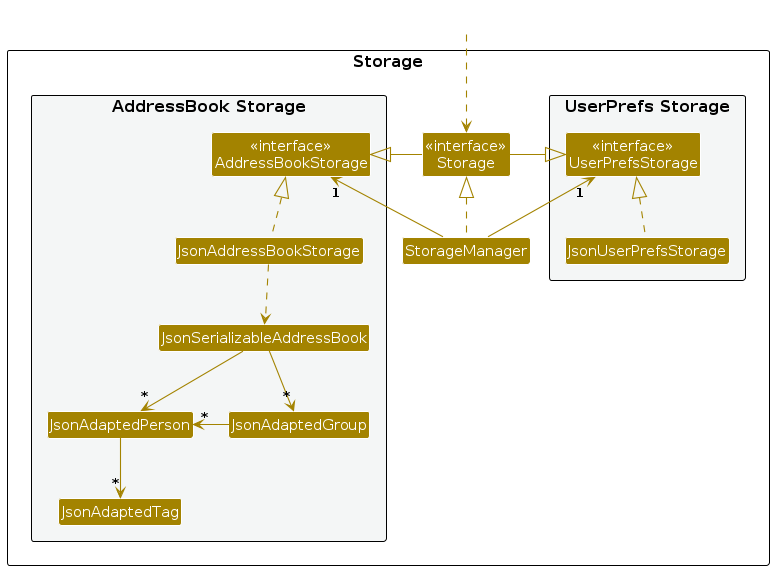
The Storage component,
- can save both address book data and user preference data in JSON format, and read them back into corresponding objects.
- inherits from both
AddressBookStorageandUserPrefStorage, which means it can be treated as either one (if only the functionality of only one is needed). - depends on some classes in the
Modelcomponent (because theStoragecomponent's job is to save/retrieve objects that belong to theModel)
Common classes
Classes used by multiple components are in the seedu.address.commons package.
Implementation
This section describes some noteworthy details on how certain features are implemented.
[Proposed] Undo/redo feature
Proposed Implementation
The proposed undo/redo mechanism is facilitated by VersionedAddressBook. It extends AddressBook with an undo/redo history, stored internally as an addressBookStateList and currentStatePointer. Additionally, it implements the following operations:
VersionedAddressBook#commit()— Saves the current address book state in its history.VersionedAddressBook#undo()— Restores the previous address book state from its history.VersionedAddressBook#redo()— Restores a previously undone address book state from its history.
These operations are exposed in the Model interface as Model#commitAddressBook(), Model#undoAddressBook() and Model#redoAddressBook() respectively.
Given below is an example usage scenario and how the undo/redo mechanism behaves at each step.
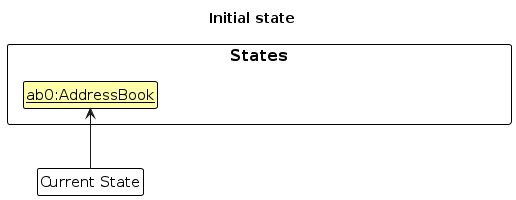
Step 1. The user launches the application for the first time. The VersionedAddressBook will be initialized with the initial address book state, and the currentStatePointer pointing to that single address book state.
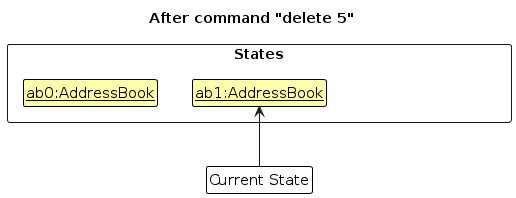
Step 2. The user executes delete 5 command to delete the 5th person in the address book. The delete command calls Model#commitAddressBook(), causing the modified state of the address book after the delete 5 command executes to be saved in the addressBookStateList, and the currentStatePointer is shifted to the newly inserted address book state.
Step 3. The user executes add n/David … to add a new person. The add command also calls Model#commitAddressBook(), causing another modified address book state to be saved into the addressBookStateList.
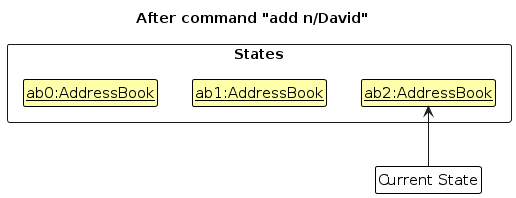
Note: If a command fails its execution, it will not call Model#commitAddressBook(), so the address book state will not be saved into the addressBookStateList.
Step 4. The user now decides that adding the person was a mistake, and decides to undo that action by executing the undo command. The undo command will call Model#undoAddressBook(), which will shift the currentStatePointer once to the left, pointing it to the previous address book state, and restores the address book to that state.
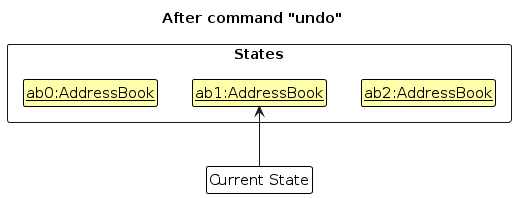
Note: If the currentStatePointer is at index 0, pointing to the initial AddressBook state, then there are no previous AddressBook states to restore. The undo command uses Model#canUndoAddressBook() to check if this is the case. If so, it will return an error to the user rather
than attempting to perform the undo.
The following sequence diagram shows how an undo operation goes through the Logic component:
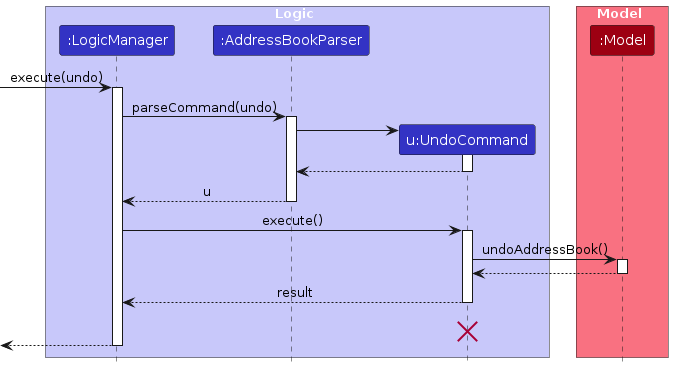
Note: The lifeline for UndoCommand should end at the destroy marker (X) but due to a limitation of PlantUML, the lifeline reaches the end of diagram.
Similarly, how an undo operation goes through the Model component is shown below:
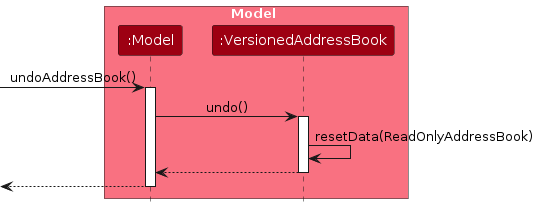
The redo command does the opposite — it calls Model#redoAddressBook(), which shifts the currentStatePointer once to the right, pointing to the previously undone state, and restores the address book to that state.
Note: If the currentStatePointer is at index addressBookStateList.size() - 1, pointing to the latest address book state, then there are no undone AddressBook states to restore. The redo command uses Model#canRedoAddressBook() to check if this is the case. If so, it will return an error to the user rather than attempting to perform the redo.
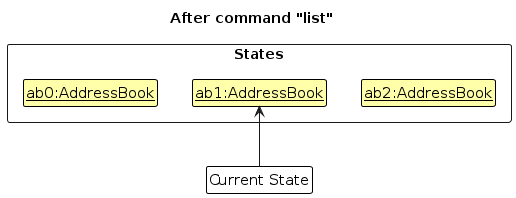
Step 5. The user then decides to execute the command list. Commands that do not modify the address book, such as list, will usually not call Model#commitAddressBook(), Model#undoAddressBook() or Model#redoAddressBook(). Thus, the addressBookStateList remains unchanged.
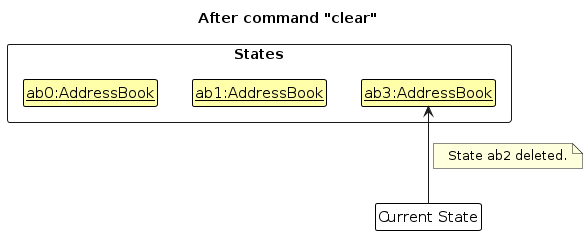
Step 6. The user executes clear, which calls Model#commitAddressBook(). Since the currentStatePointer is not pointing at the end of the addressBookStateList, all address book states after the currentStatePointer will be purged. Reason: It no longer makes sense to redo the add n/David … command. This is the behavior that most modern desktop applications follow.
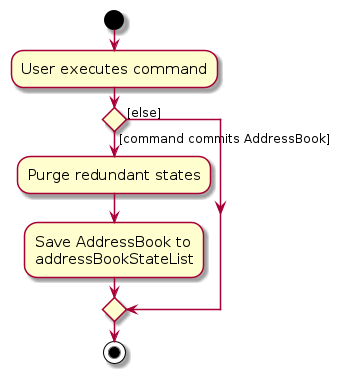
The following activity diagram summarizes what happens when a user executes a new command:
Design considerations:
Aspect: How undo & redo executes:
Alternative 1 (current choice): Saves the entire address book.
- Pros: Easy to implement.
- Cons: May have performance issues in terms of memory usage.
Alternative 2: Individual command knows how to undo/redo by itself.
- Pros: Will use less memory (e.g. for
delete, just save the person being deleted). - Cons: We must ensure that the implementation of each individual command are correct.
- Pros: Will use less memory (e.g. for
Documentation, logging, testing, configuration, dev-ops
Appendix: Requirements
Product scope
Target user profile:
- administrator of a small Non-Governmental Organisation (NGO) of less than 20 full-time staff
- responsible for managing a large network of donors, volunteers, and partners
- combined total of approximately 200 contacts
- has a need to manage volunteers participation hours
- comfortable using and editing human-readable text files for the management and storage of contact data
- works independently as a single user on a personal machine with no need for multi-user setups or shared data
- prefer desktop apps over other types
- can type fast
- prefers typing to mouse interactions
- is reasonably comfortable using CLI apps
Value proposition:
ContactsForGood (CFG) helps NGO administrators efficiently manage donors, volunteers, and partners by organising contacts and tracking engagement. With its typing-focused interface and offline, editable data, CFG hopes to streamline contact management, allowing administrators to focus on outreach and mission-critical tasks.
User stories
Priorities: High (must have) - * * *, Medium (nice to have) - * *, Low (unlikely to have) - *
| Priority | As a … | I want to … | So that… |
|---|---|---|---|
| *** | NGO administrator | view all contacts in the contact list | I can quickly find relevant information |
| *** | NGO administrator | search for contacts by name, role | I can quickly find relevant personnel |
| *** | NGO administrator | have different roles for contacts (e.g., volunteers, donors, partners) | I can manage communications more efficiently |
| *** | NGO administrator | add a new volunteer's contact information | I can add volunteers to my organisation |
| *** | NGO administrator | set a volunteer's participation hours | I can see volunteer's participation hours |
| *** | NGO administrator | edit a volunteer's information | I can keep volunteer records up to date |
| *** | NGO administrator | delete a volunteer's contact information | I can remove irrelevant or erroneous entries |
| ** | NGO administrator | sort contacts by alphabetical or insertion order | I can easily locate and manage contacts efficiently |
| ** | NGO administrator | copy to clipboard a list of all emails of addressees in the current search | I can easily send out a mass email to relevant personnel |
| ** | NGO administrator | create groups (e.g. blood drive) which contain contacts | I can group contacts by their involvement in an event |
| ** | NGO administrator | see all contacts in a group | I can easily see everyone who is involved in an event |
| ** | NGO administrator | add contacts to a group | I can easily add a new participant in an event to the existing group |
| ** | NGO administrator | remove contacts from a group | I can easily remove someone who is no longer involved in an event from an existing group |
| ** | NGO administrator | delete a group | I can delete groups after the event has concluded to avoid clutter |
Use cases
(For all use cases below, the System is ContactsForGood (CFG) and the Actor is the user, unless specified otherwise)
Use case: UC01 - Search for person(s)
MSS
User searches for a person by name.
CFG shows a list of persons which fit the criteria.
Use case ends.
Extensions
1a. User can also search by tag/role... etc.
Use case resumes at step 2.
2a. The list is empty.
Use case ends.
Use case: UC02 - Delete a person
MSS
User requests to list persons.
CFG shows a list of relevant persons.
User requests to delete a specific person in the list.
CFG deletes the person.
Use case ends.
Extensions
1a. User could also search for persons by name/tag/role... etc. (UC01).
Use case resumes at step 2.
2a. The list is empty.
Use case ends.
3a. The given index is invalid.
3a1. CFG shows an error message.
Use case resumes at step 2.
Use case: UC03 - Add volunteer hours
MSS
User requests to list persons.
CFG shows a list of relevant persons.
User requests to add some number of volunteer hours to a specific person in the list.
CFG adds the specified number of volunteer hours to the specified person's existing hours.
Use case ends.
Extensions
1a. User could also search for persons by name/tag/role... etc. (UC01).
Use case resumes at step 2.
2a. The list is empty.
Use case ends.
3a. The given index is invalid.
3a1. CFG shows an error message.
Use case resumes at step 2.
3b. The specified person is not a Volunteer.
3b1. CFG shows an error message.
Use case resumes at step 2.
Use case: UC04 - Get emails
MSS
User requests to list persons.
CFG shows a list of relevant persons.
User requests to get emails of persons on the list.
CFG copies to the user's clipboard a list of all emails of persons on the list.
Use case ends.
Extensions
1a. User could also search for persons by name/tag/role... etc. (UC01).
Use case resumes at step 2.
2a. The list is empty.
Use case ends.
Use case: UC05 - Create a group
MSS
User requests to list persons.
CFG shows a list of relevant persons.
User requests to create a group, with specified persons in the list as members.
CFG successfully creates the group.
Use case ends.
Extensions
1a. User could also search for persons by name/tag/role... etc. (UC01).
Use case resumes at step 2.
2a. The list is empty.
Use case ends.
3a. A group with the same name already exists.
3a1. CFG shows an error message.
Use case ends.
Use case: UC06 - List groups
MSS
User requests to see all existing groups.
CFG shows a list of all existing groups.
Use case ends.
Extensions
- 2a. There are no existing groups.
2a1. CFG shows an empty list.
Use case ends.
Use case: UC07 - View members of a group
MSS
User requests to see a list of groups (UC06).
User requests to see members of a group.
CFG lists all the members of the group.
Use case ends.
Extensions
1a. User may not require a list of groups.
Use case resumes at step 2.
2a. The group with specified name does not exist.
2a1. CFG shows an error message.
Use case ends.
3b. The group currently has no members.
3b1. CFG displays an empty list.
Use case ends.
Use case: UC08 - Add members to a group
MSS
User requests to list persons.
CFG shows a list of relevant persons.
User requests to add specified persons in the list to a group.
CFG adds the persons to the group.
Use case ends.
Extensions
1a. User could also search for persons by name/tag/role... etc. (UC01).
Use case resumes at step 2.
2a. The list is empty.
Use case ends.
3a. One or more of the specified indices is invalid.
3a1. CFG shows an error message.
Use case ends.
3b. The group does not exist.
3b1. CFG shows an error message.
Use case ends.
Use case: UC09 - Remove members from a group
MSS
User requests to see a list of groups (UC06).
User requests to view members of a group (UC07).
User requests to remove one or more members from a group.
CFG removes the specified members from the group.
Use case ends.
Extensions
1a. User may not require a list of groups.
Use case resumes at step 2.
2a. User may not require viewing members in a group.
Use case resumes at step 3.
3a. One or more of the specified indices is invalid.
3a1. CFG shows an error message.
Use case ends.
3b. The group does not exist.
3b1. CFG shows an error message.
Use case ends.
3c. One or more of the specified members is not currently in the group.
3c1. CFG shows an error message.
Use case ends.
Use case: UC10 - Rename a group
MSS
- User requests to see a list of groups (UC06).
- User requests to change the name of a group to a new name.
- CFG successfully renames the group.
Extensions
1a. User may not require a list of groups.
Use case resumes at step 2.
2a. The group referenced by the user does not exist.
2a1. CFG shows an error message.
Use case ends.
2b. A group with the new name already exists.
2b1. CFG shows an error message.
Use case ends.
Use case: UC11 - Delete a group
MSS
User requests to see a list of groups (UC06).
User requests to delete a group.
CFG deletes the group.
Use case ends.
Extensions
1a. User may not require a list of groups.
Use case resumes at step 2.
2a. The group does not exist.
2a1. CFG shows an error message.
Use case ends.
Use case: UC12 - Sort contacts
MSS
User requests to list persons.
CFG shows a list of relevant persons.
User requests to sort the list by name.
CFG shows the list of persons sorted by name.
Use case ends.
Extensions
1a. User could also search for persons by name/tag/role... etc. (UC01).
Use case resumes at step 2.
2a. The list of persons is empty.
Use case ends
3a. User could also request to sort by default order (insertion order), volunteer hours, donation amount, or partnership end date.
3a1. CFG would sort by the specified sort option instead.
Use case resumes at step 4.
4a. User could continue to request for a different list of persons, by searching (UC01), viewing members in a group (UC07), etc.
4a1. Sort option persists for the new list.
Use case ends.
Non-Functional Requirements
- Should work on any mainstream OS as long as it has Java
17installed. - A user with above average typing speed for regular English text (i.e. not code, not system admin commands) should be able to accomplish most of the tasks faster using commands than using the mouse.
- Should be for a single user i.e. (not a multi-user product) and should not involve data sharing across users.
- The data should be stored locally and should be in a human-readable format.
- Should work without a remote server.
- Should work as a standalone executable without additional setup beyond Java installation.
- Should not use a database management system.
- GUI should work well (i.e., should not cause any resolution-related inconveniences to the user) for standard screen resolutions 1920x1080 and higher, and, for screen scales 100% and 125%.
- GUI should be usable (i.e., all functions can be used even if the user experience is not optimal) for resolutions 1280x720 and higher, and, for screen scales 150%.
- Product should be in a single JAR or zip file.
- The final JAR or zip file should not exceed 100MB.
- The User Guide and Developer Guide must not exceed 15MB per file.
- Developer Guide and User Guide should be PDF-friendly.
- The final product should follow the object-oriented paradigm.
Glossary
| Term | Definition |
|---|---|
| Mainstream OS | Windows, Linux, Unix, MacOS |
| Human-Readable Format | A file format that can be easily understood and edited by people without specialized software (e.g., plain text or CSV) |
| Volunteer Hours | A record of the number of hours a volunteer has contributed to activities or events |
| Tag | A keyword or label applied to a contact for easier filtering or searching |
| Search Query | A user-provided input (e.g. name or role) to filter contacts in the list |
| Role | A Volunteer, Donor or Partner |
| Group | A named collection of contacts, allowing users to view specific subsets of people easily. |
| Partner | A contact who represents their company or organization as the main point of communication and collaboration. |
| Remote Server | A computer or system located on a network (e.g., the internet) that provides services or resources to other devices remotely. |
| CLI | A Command Line Interface |
Appendix: Instructions for manual testing
Given below are instructions to test the app manually.
Note: These instructions only provide a starting point for testers to work on; testers are expected to do more exploratory testing.
Launch and shutdown
Initial launch
Download the jar file and copy into an empty folder in which the app is allowed to create files.
Open a command window. Run the
java -versioncommand to ensure you are using Java 17.Launch the jar file using the
java -jar contactsforgood.jarcommand. The window size may not be optimum.
Saving window preferences
Resize the window to an optimum size. Move the window to a different location. Close the window.
Re-launch the app using the
java -jar contactsforgood.jarcommand.
Expected: The most recent window size and location is retained.
Testing the empty ContactsForGood Application
Purpose: To ensure that commands can be executed in an empty state without crashing the application.
- To begin, reset the application state to an empty state by using the
clearcommand.Test case:
list
Expected: "Listed all persons" should be printed. The area below the output should not have any contacts displayed.Test case:
listGroup
Expected: "Listed all groups" should be printed. The area below the output should not have any groups displayed.Test case:
delete 1
Expected: The error message "One or more indices provided are invalid" should be printed.Test case:
edit 1 n/John
Expected: The error message "One or more indices provided are invalid" should be printed.Test case:
search n/John
Expected: "0 person(s) listed!" should be printed. The area below the output should not have any contacts displayed.Test case:
sort s/name
Expected: "No persons found. The list is reset to its default order." should be printed.Test case:
addToGroup g/Blood Drive m/1
Expected: The error message "There is no group with name Blood Drive." should be printed.Test case:
removeFromGroup g/Blood Drive m/1
Expected: The error message "There is no group with name Blood Drive." should be printed.Test case:
editGroupName g/Blood Drive g/Blood Collection
Expected: The error message "The existing group with the given name could not be found."Other correct command formats can be tested and should print the similar messages as above.
Incorrect command formats can be tested and should print the respective error messages.
Lastly, after all these are done, one can test the following commands which will make the address book non-empty:
addandcreateGroupTest case:
add n/Nicholas Tan p/91234567 e/e1234567@u.nus.edu a/21 Lower Kent Ridge Rd, Singapore 119077
Expected: "New person added: Nicholas Tan; Phone: 91234567; Email: e1234567@u.nus.edu; Address: 21 Lower Kent Ridge Rd, Singapore 119077; Tags: " should be printed.Test case:
createGroup g/NUS m/1
Expected: "Created group NUS" should be printed.
Adding a person
- Adding a person to the address book without the optional fields.
- Test case:
add n/Nicholas Tan p/91234567 e/e1234567@u.nus.edu a/21 Lower Kent Ridge Rd, Singapore 119077add n/Nicholas Tan p/91234567 e/e1234567@u.nus.edu a/21 Lower Kent Ridge Rd, Singapore 119077
Expected:
If Nicholas Tan was previously added in step 13 of "Testing the empty ContactsForGood Application", both commands should print the error message: "This person already exists in the address book".
Else, the first addition should print "New person added: Nicholas Tan; Phone: 91234567; Email: e1234567@u.nus.edu; Address: 21 Lower Kent Ridge Rd, Singapore 119077; Tags: ", while the second addition should print the error message: "This person already exists in the address book".
- Test case:
- Adding a person to the address book with the optional tag field.
- Test case - with Tag:
add n/Abel Lee p/81234567 e/d1234567@u.nus.edu a/20 Lower Kent Ridge Rd, Singapore 119077 t/Student
Expected: "New person added: Abel Lee; Phone: 81234567; Email: d1234567@u.nus.edu; Address: 20 Lower Kent Ridge Rd, Singapore 119077; Tags: [Student]" should be printed.
- Test case - with Tag:
- Adding a person to the address book with the optional role field.
- Test case - with Partner Role:
add n/Jason Tan r/partner p/61234567 e/f1234567@u.nus.edu a/19 Lower Kent Ridge Rd, Singapore 119077 ped/2024-12-03
Expected: "New partner added: Jason Tan; Phone: 61234567; Email: d1234567@u.nus.edu; Address: 20 Lower Kent Ridge Rd, Singapore 119077; Tags: ; Partnership End Date: 2024-12-03" is printed and the address book contains Jason Tan, with the label PARTNER and fields with the correct details. - Test case - with Volunteer Role:
add n/Bailey Ang r/volunteer p/91234568 e/g1234567@u.nus.edu a/18 Lower Kent Ridge Rd, Singapore 119077 h/19Expected: "New volunteer added: Bailey Ang; Phone: 91234568; Email: g1234567@u.nus.edu; Address: Singapore 119077; Tags: ; Hours: 19" is printed and the address book contains Bailey Ang, with the label VOLUNTEER and fields with the correct details. - Test case - with Donor Role:
add n/Tyson Chua r/donor p/61234568 e/tysonchua22@mailer.com a/17 Lower Kent Ridge Rd, Singapore 119077 d/12
Expected: "New donor added: Tyson Chua; Phone: 61234568; Email: tysonchua22@mailer.com; Address: 17 Lower Kent Ridge Rd, Singapore 119077; Tags: ; Donated Amount: 12.0" is printed and the address book contains Tyson Chua, with the label DONOR and fields with the correct details. - Test case - with invalid Role:
add n/Mary r/Tester p/61234568 e/tysonchua22@mailer.com a/17 Lower Kent Ridge Rd, Singapore 119077 d/12
Expected: The error message "Invalid role. Valid roles are: Volunteer, Donor, Partner, Person." is printed.
- Test case - with Partner Role:
- The tester should attempt testing with incorrect command formats and other combinations of prefixes, such as
testing
r/together witht/.
Edting a person
This test section's prerequisite is that you have gone through the add person section above, and therefore you should
have a person named "Jason Tan" who has the role Partner. It also assumes that Jason Tan has an index of 3 on the
displayed person list. If he does not, you should use the respective index that he has on the displayed list, for the
INDEX field in the edit command.
Editing a person's name
- Test case - edit to a name which does not exist:
edit 3 n/Jason Ong
Expected: "Edited partner: Jason Ong; Phone: 61234567; Email: d1234567@u.nus.edu; Address: 20 Lower Kent Ridge Rd, Singapore 119077; Tags: ; Partnership End Date: 2024-12-03" should be printed. The name on the displayed list should be edited. - Test case - edit to a name which already exists:
This command assumes that the person "Abel Lee" exists in the address book. If not, follow step 2i. in adding a person to add this person to the address book.
edit 3 n/Abel Lee
Expected: "This person already exists in the address book." should be printed. No names should be changed. - Test case - edit to the same name:
edit 3 n/Jason Ong
Expected: "Edited partner: Jason Ong; Phone: 61234567; Email: d1234567@u.nus.edu; Address: 20 Lower Kent Ridge Rd, Singapore 119077; Tags: ; Partnership End Date: 2024-12-03" should be printed. However, no changes to the address book should be observed.
- Test case - edit to a name which does not exist:
Editing a person's role attribute
- Test case - edit an attribute which exists for the person's role:
edit 3 ped/2024-12-11
Expected: "Edited partner: Jason Ong; Phone: 61234567; Email: d1234567@u.nus.edu; Address: 20 Lower Kent Ridge Rd, Singapore 119077; Tags: ; Partnership End Date: 2024-12-11" should be printed. The End Date displayed for Jason Ong on the address book should be changed to 2024-12-11. - Test case - edit an attribute which does not exist for the person's role:
edit 3 h/3
Expected: "Hours field should not exist for role: PARTNER" should be printed and no changes to the address book should be observed.
- Test case - edit an attribute which exists for the person's role:
Editing no attributes
- Test case:
edit 3
Expected: "At least one field to edit must be provided." should be printed and no changes to the address book should be observed.
- Test case:
The tester should attempt testing editing of other fields and other invalid inputs.
Searching persons by field
This test section's prerequisite is that you have gone through the add person section above, and therefore you should
have a person named "Tyson Chua" who has the role Donor. It also assumes that Tyson Chua has an index of 4 on the
displayed person list. If he does not, you should use the respective index that he has on the displayed list, for the
INDEX field in the edit command.
- Search for a person with a field that exists in the app
- Test case - field exists for the person:
search n/Tyson
Expected: "1 person listed!" is printed. The displayed list shows the person(s) who fulfill the search condition. - Test case - search for multiple people:
search n/Tyson Jason
Expected: "2 person(s) listed!" is printed. The displayed list shows the person(s) whose names contain Jason and Tyson. - Test case - search for a field that exists but no person has:
search n/Whoevenhassuchalongnameitsnotpossible
Expected: "0 person(s) listed!" is printed. The displayed list does not show anybody. - The tester can explore searching with other prefixes and incorrect inputs.
- Test case - field exists for the person:
- Search for a person with a field that does not exist in the app
- Test case:
search name/FarhanExpected: The error message for invalid command, with examples of how to use the search command is printed.
- Test case:
Listing all persons
This test section's prerequisite is that you have gone through the add person section above and added a few contacts.
- Listing all persons
- Test case:
list
Expected: "Listed all persons." should be printed. All contacts added should be displayed below. - Test case - additional prefixes after are ignored:
list n/This should list as usualshould have the same behaviour as test case 1.
- Test case:
Sorting the displayed list
This test section's prerequisite is that you have gone through the add person section above and added a few contacts.
- Sorting the address book while all persons are being shown
- Test case - sort by name:
sort s/name
Expected: "Sorted by name." should be printed. Contacts should be arranged in alphabetical order. - Test case - sort by hours:
sort s/hours
Expected: "Sorted by hours." should be printed. Volunteers are at the top-most portion of the displayed list, sorted by hours contributed in descending order. Other roles are still shown below the volunteers. - Testers should test the other 2 sort metrics,
s/donationsands/end_datefor donors and partners respectively.
- Test case - sort by name:
- Sorting the address book while only searched users are being shown
- This subsection assumes that you have 2 persons with person roles added during the add command test section.
- Test case - search for persons with role person and sort by name:
search r/personsort s/name
Expected: "Sorted by name." is printed and the address book displays contacts filtered based on the search condition and sorted in alphabetical order.
Deleting a person
Deleting a person while all persons are being shown
Prerequisites: List all persons using the
listcommand. Multiple persons in the list.Test case:
delete 1
Expected: First contact is deleted from the list. Details of the deleted contact shown in the status message. Timestamp in the status bar is updated.Test case:
delete 0
Expected: No person is deleted. Error details shown in the status message. Status bar remains the same.Other incorrect delete commands to try:
delete,delete x,...(where x is larger than the list size)
Expected: Similar to previous.
Creating a group
This test section's prerequisite is that you have gone through the add person section above and added at least 5 contacts.
- Creating a group while all persons are being shown
- Test case - Group name is not in use:
createGroup g/Blood Drive m/1 2
Expected: "Created group Blood Drive" should be printed, and the first 2 people on the contact list should be in the group. The displayed list should change from a list of contacts to a list of groups. - Test case - Group name already in use:
To do this, you must first do test case 1.
createGroup g/Blood Drive m/1 2
Expected: The error message "This group name already exists" should be printed, and no new groups should be created. If the user is currently looking at the contact list (not the group list), they should not be redirected to the group list. - Test case - Closed range indices:
createGroup g/Food Bank m/2-4
Expected: "Created group Food Bank" should be printed, and 3 people (the 2nd to 4th) on the contact list should be in the group. The displayed list should change from a list of contacts to a list of groups. - Test case - Indices out of bounds:
createGroup g/Donation m/6
Expected: The error message "One or more indices provided are invalid." should be printed, and no new groups should be created. If the user is currently looking at the contact list (not the group list), they should not be redirected to the group list. - The tester should try different invalid inputs, such as using the wrong format for
INDICES.
- Test case - Group name is not in use:
- Creating a group while searched persons are being shown
- Test case:
search r/personcreateGroup g/Donation m/1 2
Expected: "Created group Donation." should be printed, and the first 2 people on the currently searched list should be in the group. The displayed list should change from a list of contacts to a list of groups.
- The tester should try different invalid inputs and other combinations of search and createGroup.
- Test case:
Adding new members to an existing group
This test section's prerequisite is that you have gone through the add person section and create group section above.
- Adding members to a group while all persons are being shown
- Test case:
addToGroup g/Blood Drive m/3 4
Expected: "The following users were added to the group Blood Drive: Jason Ong Nicholas Tan" should be printed. The displayed list should change from a list of contacts to a list of groups. The group size of Blood Drive should increase by 2. The members should be updated with the new members' names. - Test case - adding to group that does not exist:
addToGroup g/ThisGroupShouldNotExist m/1
Expected: "There is no group with name ThisGroupShouldNotExist." should be printed. No group size or members should change. - The tester should try closed-range indices inputs and invalid inputs.
- Test case:
- Adding members to a group while searched contact list is being shown
- Test case:
search r/personaddToGroup g/Food Bank m/1
Expected: "The following users were added to the group Food Bank: Abel Lee" should be printed. The first user on the searched list should be added to the group Food Bank.
- The tester should try other combinations of search and addToGroup, as well as invalid inputs.
- Test case:
Removing members from an existing group
This test section's prerequisite is that you have gone through the add new members to existing group section.
- Removing members to a group while all persons are being shown
- Test case:
removeFromGroup g/Blood Drive m/3 4
Expected: "The following users were removed to the group Blood Drive: Jason Ong Nicholas Tan" should be printed. The displayed list should change from a list of contacts to a list of groups. The group size of Blood Drive should decrease by 2. The members in the group should have been updated. - Test case - removing from group that does not exist:
removeFromGroup g/ThisGroupShouldNotExist m/1
Expected: "There is no group with name ThisGroupShouldNotExist." should be printed. No group size or members should change. - Test case - removing a person who is not in a group:
removeFromGroup g/Food Bank m/5
Expected: "No users were removed from the group Food Bank. The following users were not in the group Food Bank and therefore could not be removed from the group, the rest of the users have been removed accordingly: Tyson Chua" should be printed, and no group size or members should change. - The tester should try closed-range indices inputs and invalid inputs.
- Test case:
- Removing members from a group while searched contact list is being shown
- Test case:
search r/personremoveFromGroup g/Food Bank m/1
Expected: "The following users were removed from the group Food Bank: Abel Lee" should be printed. The first user on the searched list should be removed the group Food Bank.
- The tester should try other combinations of search and addToGroup, as well as invalid inputs.
- Test case:
Editing a group's name
This test section's prerequisite is that you have gone through the create group section and created a group named
Blood Drive and Food Bank.
- Renaming a group
- Test case:
editGroupName g/Blood Drive g/Blood Drive 2024
Expected: "Edited group name from Blood Drive to Blood Drive 2024." should be printed. The group's name on the UI should also have changed. - Test case - renaming a group name that does not exist:
This test case assumes you have done test case 1.
editGroupName g/Blood Drive g/Blood Drive 2024
Expected: The error message "The existing group with the given name could not be found." should be printed. No group names should be changed. - Test case - renaming a group to a name that already exists:
This test assumes you have done test case 1.
editGroupName g/Blood Drive 2024 g/Food Bank
Expected: "There already exists a group with the new name you have chosen." should be printed and no group names should be changed.
- Test case:
Listing all groups
This test section's prerequisite is that you have gone through the create group section above and created a few groups.
- Listing all groups
- Test case:
listGroups
Expected: "Listed all groups." should be printed. All contacts added should be displayed below. - Test case - additional prefixes after are ignored:
listGroups n/This should list as usualshould have the same behaviour as test case 1.
- Test case:
Deleting a group
This test section's prerequisite is that you have gone through the create group section above and created a few groups.
- Deleting a group
- Test case:
deleteGroup g/Blood Drive 2024
Expected: "Deleted group Blood Drive 2024." should be printed. The group should be removed from the displayed group list. - Test case - deleting a group name that does not exist:
This test case assumes you have done test case 1.
deleteGroup g/Blood Drive 2024
Expected: The error message "Group with that name does not exist." should be printed. No groups should be deleted.
- Test case:
Appendix: Planned Enhancements
Team size: 5
- Allow contacts to have multiple phone numbers: Currently, contacts are only allowed to have one phone number. Realistically, contacts may have multiple phone numbers (e.g. home number, office number), so we plan to allow for contacts to have multiple numbers attached to them.
- Improve input validation for contact names: Certain symbols are currently not allowed for contact names (e.g. '-', '@', 's/o'). All of these symbols can appear in official, legal names, so we plan to add support for them.
- Allow creation of empty groups: Currently, groups must be created with at least one member. It may improve the user experience to be able to first create an empty group and subsequently add users to it.
- Allow case-insensitive commands: Currently, commands are case-sensitive. For example, typing creategroup will not work, because the app expects "createGroup" with the capitalized G. Making commands case-insensitive has no negative repercussions and can help users type slightly faster.
- Improve handling of invalid prefixes in commands: Currently, if users input invalid prefixes (e.g.,
n/John nn/Jack), the application treats the invalid prefix (nn/) as part of the value for a valid prefix (n/). This can lead to confusion and incorrect data parsing. We plan to enhance the system to detect invalid prefixes and provide clear feedback to users about their errors, ensuring proper parsing and validation of command inputs. - Implement email and phone number verification and update identification method: Currently, the app uses names for identification, requiring them to be unique, while emails and phone numbers are allowed to be non-unique. However, since names often have natural duplicates in real-life scenarios, we plan to shift to using email and mobile phone numbers as unique identifiers. This change will include verification of email and phone numbers before binding them to a user and will allow duplicate names to better reflect real-world usage.
- Improve notation for donations: Currently, scientific notation will be used automatically for very large values. It may improve user experience to have the values be displayed in a more readable format instead.
- Enable sorting in both directions: Currently, sorting is restricted to a predefined order (e.g. ascending or descending). We plan to improve the sort functionality by allowing users to toggle between ascending and descending order.
- Text wrapping for long names: At present, when a contact name is too lengthy, it gets truncated with '...', making it difficult for users to view the full name. Implementing text wrapping in the name field will accommodate longer names and allow users to see the entire contact name.